DayPilot
How to change the code to display varchar and date type data instead of two datetime type for the daypilot calendar?
12 years ago.
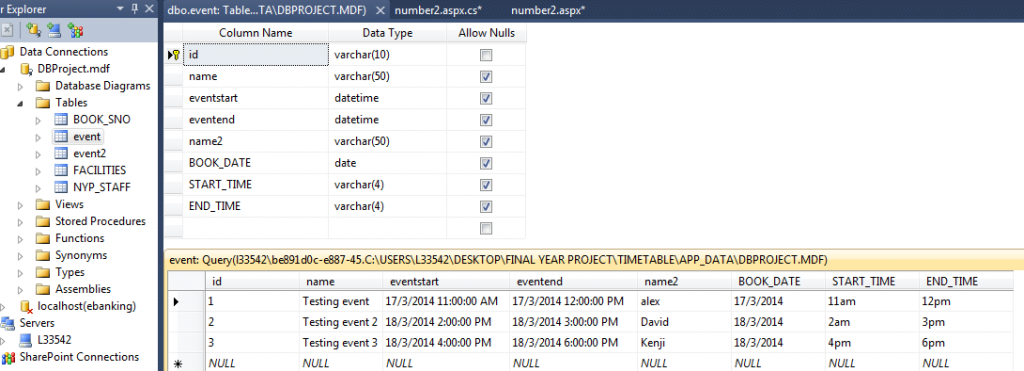
I have this table called event. I am using daypilot calendar control to display the data from the event table. Currently I am using name, name2, eventstart and eventend column field data to display in the calendar and it works. But now I would like to display BOOK_DATE, START_TIME and END_TIME column field data instead of eventstart and eventend. Because now that the START_TIME and END_TIME is using varchar instead of datetime, and because the date is now seperated into one field which is BOOK_DATE, I don't know how to change the code.
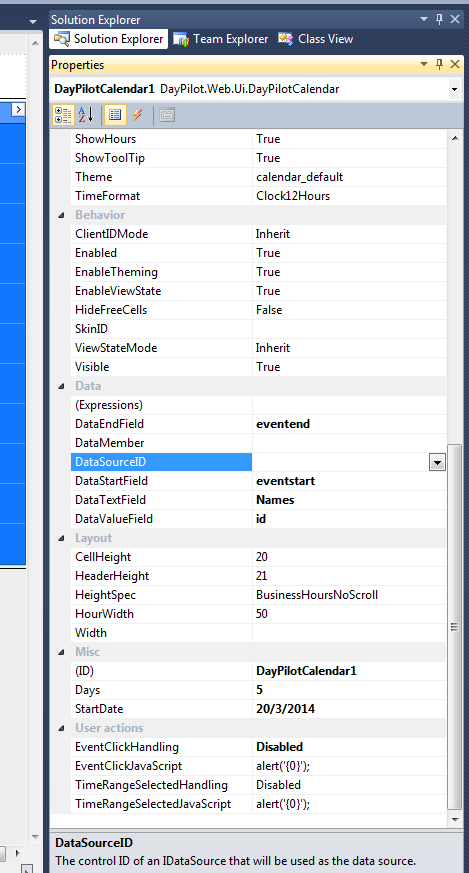
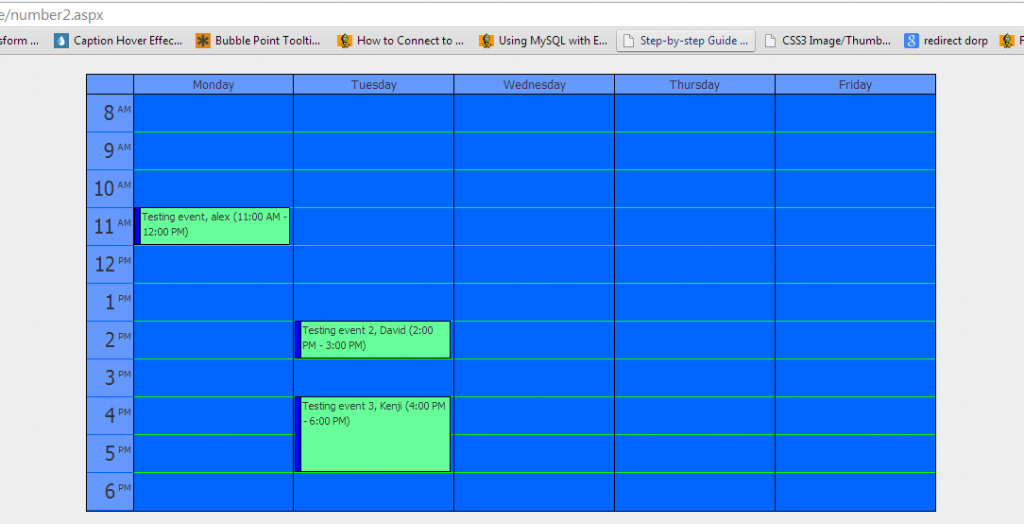
For the 3rd screenshot I am using name, name2, eventstart and eventend to display. But I would like to have the same output like the 3rd screenshot but using BOOK_DATE, START_TIME and END_TIME column field data instead. you can see from the 2nd screenshot the properties, If i replace eventstart with START_TIME and replace eventend with END_TIME. Where should I put the BOOK_DATE? I think i explained it very specific already thanks.
I posted my question at asp.net forum and it can't be solve http://forums.asp.net/t/1976209.aspx?for+my+daypilot+calendar+control+how+to+change+the+code+to+display+varchar+and+date+type+data+instead+of+two+datetime+type+ . Over there, I posted 3 screenshots.
I also posted at video at https://www.youtube.com/watch?v=z4SAihcjyek&list=UUmCCdX9I1m4aSr0m50H1Dyg . I followed the guy codes who is helping me at asp.net forum and it doesn't work also. But he says it worked for him. And he suggest that I post here for help.
Sorry I posted this the second time because previous one i forgot to add screenshots.
MY SOURCE CODE
<html xmlns="http://www.w3.org/1999/xhtml">
<head runat="server">
<link rel="stylesheet" href="stylesheets/style.css" type="text/css" />
<title></title>
</head>
<body>
<form id="form1" runat="server">
<div style="text-align: center">
<asp:Label ID="lblVenue" runat="server"
style="font-size: xx-large; font-weight: 700" Text="Label"></asp:Label>
</div>
<DayPilot:DayPilotCalendar ID="DayPilotCalendar1" runat="server"
DataStartField="eventstart"
DataEndField="eventend"
DataTextField="Names"
DataValueField="id"
Days="5"
EventMoveHandling="CallBack" BackColor="#0066FF" BusinessBeginsHour="8"
BusinessEndsHour="19" CssOnly="False" EventBackColor="#66FF99"
HourBorderColor="Lime" HourHalfBorderColor="#0066FF"
HourNameBackColor="#6699FF" HourNameBorderColor="#0066FF" HoverColor="#0066FF"
NonBusinessBackColor="#0066FF"
style="top: -1px; left: 8px; margin-right: 6px;" DayEndsHour="6" HeaderDateFormat="dddd"
>
</DayPilot:DayPilotCalendar>
</form>
</body>
MY CODE BEHIND CODE
public partial class number2 : System.Web.UI.Page
{
protected void Page_Load(object sender, EventArgs e)
{
lblVenue.Text = Session["roomvalue"] != null ? Session["roomvalue"].ToString() : "";
if (!IsPostBack)
{
DayPilotCalendar1.StartDate = DayPilot.Utils.Week.FirstWorkingDayOfWeek(new DateTime(2014, 03, 17));
DayPilotCalendar1.DataSource = dbGetEvents(DayPilotCalendar1.StartDate, DayPilotCalendar1.Days);
DataBind();
}
}
private DataTable dbGetEvents(DateTime start, int days)
{
string constr = ConfigurationManager.ConnectionStrings["ProjectConnectionString"].ConnectionString;
SqlDataAdapter da = new SqlDataAdapter("SELECT [id], [Name] + ', ' + Name2 AS [Names], [EventStart], [EventEnd] FROM [event] WHERE NOT (([eventend] <= @start) OR ([eventstart] >= @end))", constr);
da.SelectCommand.Parameters.AddWithValue("start", start);
da.SelectCommand.Parameters.AddWithValue("end", start.AddDays(days));
DataTable dt = new DataTable();
da.Fill(dt);
return dt;
}
}