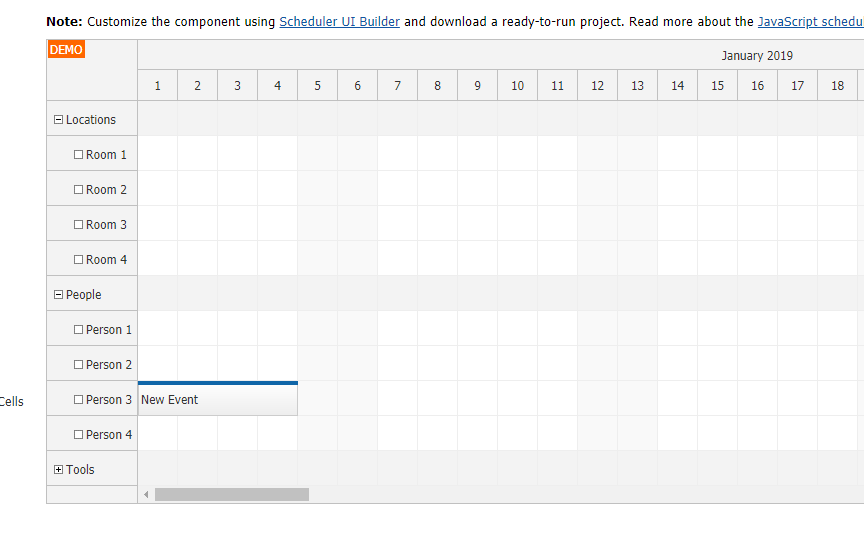
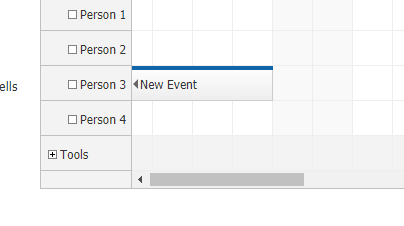
Add arrow to floating event label when event started before scheduler view-port
Asked by Steve. S 7 years ago.
Hi Dan,
We really like feature to show floating label so we could track event info even when event is too long. But I think one thing is missing. If event starts before view-port and you scroll to the beginning of view-port there won't be arrow indicator to show user that event started before view-port.
Is there built-in way to indicate that event started before scheduler view-port?
You can't see from screenshot directly. But 'New Event' starts before scheduler view-port time so I expected an arrow indicator
Answer posted by Dan Letecky [DayPilot] 7 years ago.
Hi Steve,
Such events are marked with "scheduler_default_event_continueleft" (those starting before startDate) and "scheduler_default_event_continueright" (those ending after startDate + days).
In the built-in theme, there is no special style associated with these classes but you can add it to show an arrow or another type of indicator.
Comment posted by Steve S. 7 years ago.
Hi Dan, this is exactly what I had in mind. Somehow I missed those classes while inspecting events.
Thanks a lot.
This question is more than 1 month old and has been closed. Please create a new question if you have anything to add.
 DayPilot