DayPilot
DayPilotCalendar HeaderHeightAutoFit not working sometimes inTabContainer is an ASP.NET AJAX Control
Asked by Anonymous
13 years ago.
13 years ago.
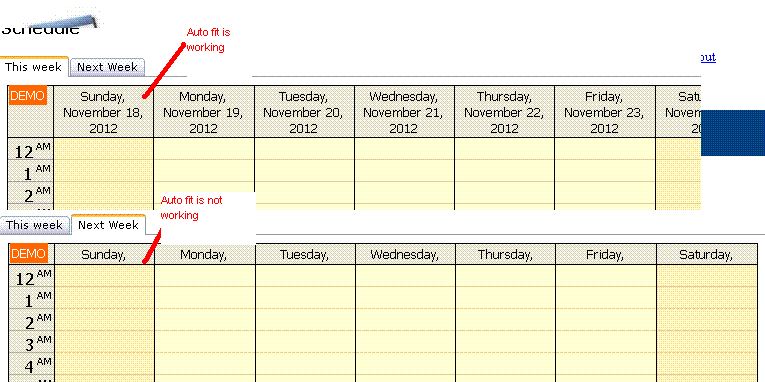
I have two DayPilotCalendars in a page. One for this week and one for next week.
They were in TabContainers of asp.net AJAX Control.
This week is in TabContainer1 and next week is in TabContainer2.
The ActiveTabIndex="0"
I have set both DayPilotCalendar HeaderHeightAutoFit to true.
After the page is loaded, the HeaderHeightAutoFit for this week works. But when I click next week, it does not work.
If I set The ActiveTabIndex="1", Next week HeaderHeightAutoFit works and this week doesn't work.