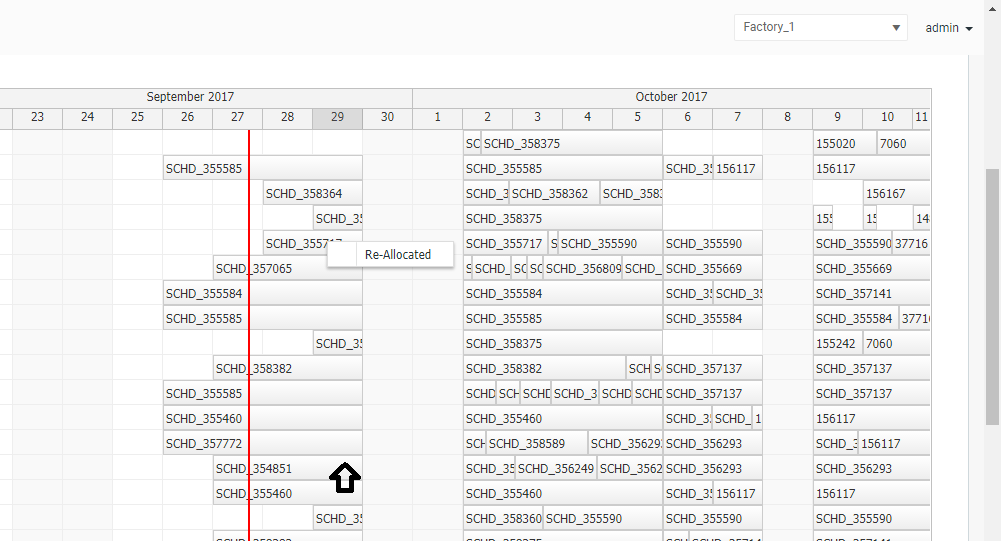
After rendering the schedule I scrolled down and right clicked on an event as shown in the attachment. In this case I have used a context menu with an onclick() method, which shows a label "Re-Allocated". Ideally the label should appear right next to the clicked event. If I click on an event without scrolling down it works as expected. But if I scroll down and click on an event the label appears somewhere else as shown in the attachment.
Answer posted by Dan Letecky [DayPilot] 9 years ago.
This should be already fixed in the latest version of DayPilot Pro on all platforms. Please let me know if the problem persists.
Comment posted by Brian LaLonde 9 years ago.
I noticed that the attached screenshot possibly has a "header" in the app (shows a grey section with "Factory_1" dropdown and "admin").
I have a similar problem. The menus and bubbles show up exactly the # of px height as the app header height below where they are supposed to show up.
In my case, my app is angular with bootstrap and I have a header set-up by setting body { margin-top: 50px;}.
I'm exploring how to change my app styling so I don't set that margin on the body...
And a problem in finding a fix is that I cannot replicate the problem as a simple example. The problem only shows up in my complex app.
Anyway, my quick fix is to set CSS:
.menu_default_main {
margin-top:-50px;
}
.bubble_default_main {
margin-top:-50px;
}
Comment posted by Dan Letecky [DayPilot] 9 years ago.
It turns out that it's possible to reproduce the problem using the following CSS:
 DayPilot