search envelope-o feed check
Home Unanswered Active Tags New Question
user comment-o

search on v.events.list?

Asked by Ed
21 days ago.

Hi,

Would like to do a live search on my web forms project without having to go back and forth to the database, etc. In looking at the page source of my monthly calendar, I see a line labeled “v.events.list” which has all of the data that I’m looking to search through. Are there any native capabilities to perform a search on this dataset? Lacking that, does anyone have any techniques for getting this data? I’ve tried a couple of JavaScript code samples (from Google) for getting the data from the page source but so far, no real success.

Thanks in advance - Ed

Answer posted by Dan Letecky [DayPilot]
21 days ago.

Yes, this is possible using the events.find() method. You can also access the events.list array directly.

In ASP.NET WebForms, you need the client-side object to access the API.

<DayPilot:DayPilotMonth ... ClientObjectName="month" ... />

Find events:

const event = month.events.find(1);

or

const events = months.events.find(e => e.data.text.includes("important"));
Comment posted by Ed
20 days ago.

Hi Dan, ok thanks for that - so the “e.data.text” value in the above code snippet is the same as the “events.list” array? I’m assuming that I would need to loop through the array and do other things (show/hide, etc.) - would it be something along the lines of:

let searchQuery = document.getElementById("searchbox").value.toLowerCase(); //search field on the page

const events = months.events.find(e => e.data.text.includes(searchQuery));

for (let i = 0; i < events.length; i++) {

if (events.includes(searchQuery)) {

…do something…

} else {

…do something else…

}

…etc.

Thanks - Ed

Comment posted by Ed
20 days ago.

OK, disregard my previous - found an example on how to access the events.list array and I can currently output to console records based on my search field entry. Now just need to figure out how to show/hide based on the searched values.

Comment posted by Ed
19 days ago.

Alright, so I’ve found the reference for events.remove() and have two questions:

  1. Does events.remove() remove the event from the local view only or is there some weird magic that would prevent the event from being visible on the next page reload / update / etc.? My data is loaded from SQL.

  2. The example shows how to remove an event based on the result of a .find method - is there an example for how to remove events that were not part of the results of the .find?

Thanks - Ed

Comment posted by Ed
16 days ago.

OK, so after a bunch of trial and error (a lot of error…) I have a client-side function that extracts the event id’s and arrays them….currently outputting them to the console while I’m testing. What would be the best way to show or hide events based on that array? Do I need to take a trip back to the server and re-query the database with the id’s (where id in(‘‘,’’), etc. or are there client-side options to only show the values that match the arrayed id’s?

I saw the info on “filterText”, etc. but am not really sure how those apply in this situation - any advice would be helpful…. thanks.

Comment posted by Dan Letecky [DayPilot]
16 days ago.

There is an events.filter() method that updates the view on the client side to show only the specified events.

However, be careful with mixing the client-side and server-side approach in the ASP.NET WebForms version. In some cases, it may result in the server and client being out of sync.

It may be more convenient for you to implement this on the server side using the commandCallBack() method. It lets you send a custom command to the server and handle it using the Command event handler. There you can reload the events and apply the filter by modifying the data source, and request a client-side update.

Calling events.remove() only removes the event on the client side. But it is possible to notify the server using a built-in notify mechanism - it is described in the Client-Side Event API docs page, in the ASP.NET WebForms section.

Comment posted by Ed
15 days ago.

Thanks Dan, I’m close I think…more work tomorrow. Appreciate the info!

Comment posted by Dan Letecky [DayPilot]
15 days ago.

Great, thanks for the update!

Comment posted by Ed
13 days ago.

OK, one last thing (I think…I hope…) - I have my search function working using client-side components…. was actually pretty simple once I came up with the right combo:

if (!document.getElementById("searchbox").value == "") {
	const query = document.getElementById("searchbox").value;
        const allEvents = dp_month.events.list;
	//get the current events list and write to a hidden field
        document.getElementById("<%= hiddenFieldEventList.ClientID %>").value = allEvents;

	//using bubbleHTML since it has all of the searchable data...note that both bubbleHtml and the query need to be forced toUpperCase to work properly.
	let filteredEventsData = dp_month.events.list.filter(data => data.bubbleHtml.toUpperCase().includes(query.toUpperCase()));

        dp_month.events.list = filteredEventsData;
	dp_month.update();

This works very fast and for my purposes does what I need it to do. Now, I was hoping to be able to reset the search by storing the events.list in an asp hiddenfield so when the reset is clicked the monthly would update with the stored events.list:

 //reset for the search field - not part of the search function
        const input = document.getElementById('searchbox');
        const resetButton = document.getElementById("btn_resetFromSearch");
        input.addEventListener('input', (event) => {
            // This code runs when 'Enter' is pressed OR the 'x' is clicked
            if (event.currentTarget.value === "") {
                dp_month.events.list = document.getElementById("<%= hiddenFieldEventList.ClientID %>").value;
                dp_month.update();

However, this is not working as expected - the code above simply displays a blank calendar. In looking at the console (I had logging in the code earlier in my testing) the events.list shows up in the “object Object” format…no actual data.

I tried changing the line that write the event.list (1st code block) to:

const allEvents = JSON.stringify(dp_month.events.list);

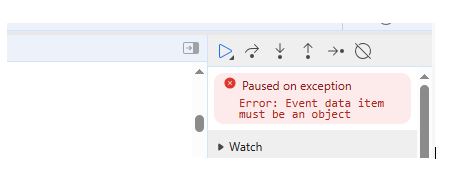
When I do this, I see the properly-formatted events.list in the console and the data assigned to the hiddenfield when I view the source. However, upon resetting the search I get a JavaScript error “Event data item must be an object“ (error shows in dev tools, nothing on the actual page).

For now, I have the code changed so when the search is reset it reloads the dataset and updates calendar so not a work-stoppage. Any ideas as to why I’m getting the js error? The client-side methods are so much faster than my server-side routines so if it can be done the way I’ve shown above that would be great. I’ve attached a couple of images showing consol output and the error message for reference.

Thanks again - Ed

Comment posted by Dan Letecky [DayPilot]
13 days ago.

It’s almost right. JSON.stringify() converts the array to a string. When loading it again, you need to convert the string to an array using JSON.parse().

Comment posted by Ed
13 days ago.

Thanks Dan,

Good new, JSON.parse fixed the issue of restoring the events - very fast reload of the events.

Bad news, I ran into other errors when trying to do anything else on the page. It started with the page complaining about “potentially dangerous form values…” (not unexpected, there’s html in the events.list). Worked around that and then other problems popped up; thinking maybe a view state violation problem or something like that, so more research needed.

For now, I’ll stick with the fast search, slow-ish reset until I can build out a new test system that won’t interfere with other users…thanks again for the assistance!

Comment posted by Ed
12 days ago.

OK, for what it’s worth I have this working now…needed to encode and decode “dangerous characters”. For anyone using web forms who might be interested:

<!-- search box with a linkbutton that calls the function -->
<label for="searchbox">Search Schedule</label><input type="search" id="searchbox" placeholder="search..."><asp:LinkButton ID="lnkBtn_search" runat="server" Text="search" OnClientClick="searchEvents();return false;" class="buttonLocal3" />
	//02-27-2026: functions to simulate html encode and decode functions.
        //IMPORTANT: You have to use the 'HTML Name' values and not the 'HTML Number' values 
        //otherwise you still get the "dangerous characters" error.
	function htmlEncode(s) {
	return s.replace(/&/g, '&amp;')
            .replace(/{/g, '&lcub;')
            .replace(/}/g, '&rcub;')
            .replace(/\[/g, '&lsqb;')
            .replace(/\]/g, '&rsqb;')
            .replace(/</g, '&lt;')
	    .replace(/>/g, '&gt;')
            .replace(/:/g, '&colon;')
	}
    function htmlDecode(s) {
        return s.replace(/&amp;/g, '&')
            .replace(/&lcub;/g, '{')
            .replace(/&rcub;/g, '}')
            .replace(/&lsqb;/g, '[')
            .replace(/&rsqb;/g, ']')
            .replace(/&colon;/g, ':')
            .replace(/&lt;/g, '<')
            .replace(/&gt;/g, '>')
    }

function searchEvents() {
       if (!document.getElementById("searchbox").value == "") {
	        const query = document.getElementById("searchbox").value;

		//get the full events.list and conver tto a text string.
		const allEvents = JSON.stringify(dp_month.events.list);
		console.log(htmlEncode(allEvents)); //comment out when debugging is complete

		//get the current events list and write to a hidden field	
                document.getElementById("<%= hiddenFieldEventList.ClientID %>").value = htmlEncode(allEvents);

	        //I'm using bubbleHTML since I populated it with all of the searchable data
                //note that both bubbleHtml and the query need to be forced toUpperCase to work properly.
	        let filteredEventsData = dp_month.events.list.filter(data => data.bubbleHtml.toUpperCase().includes(query.toUpperCase()));

                //overwrite the events.list with the search and update
                dp_month.events.list = filteredEventsData;
	        dp_month.update();
			
	} else {
	   //do nothing....
} 

At the bottom of the .aspx page you’ll need another <script></script> block for clearing the search. I tried doing it with a deferred external script, but results were inconsistent:

<script>
        //reset for the search field
        const input = document.getElementById('searchbox');
        const resetButton = document.getElementById("btn_resetFromSearch");
        input.addEventListener('input', (event) => {
            // This code runs when the search box is manually cleared OR the 'x' is clicked
            if (event.currentTarget.value === "") {
			//retrieve the hidden field value
			const hiddenEventsList = document.getElementById("<%= hiddenFieldEventList.ClientID %>").value;
			
                        //decode the encoded html
                        const hiddenEventsListDecoded = htmlDecode(hiddenEventsList);
                      
                        //use json.parse() on the data so the calendar can read it.
			const eventsListArray = JSON.parse(hiddenEventsListDecoded);
 
              //assign the array to the events.list and update the calendar.
               dp_month.events.list = eventsListArray;
               dp_month.update();

            } else {
                //do nothing
            }
        });

    </script>

End result is that upon clicking the search button the calendar immediately removes any records that do come back with at least a partial match to the searched value. Upon clearing the search box, either by back typing or by clicking the “x”, the stored events list is restored to the calendar.

My original thought that I was violating the page view state turned out to be incorrect so all context functions, etc. work as expected. The searched view does not currently persist when performing a right-click function, etc. but only because I haven’t built the persistence part into it as of yet.

Thanks again to Dan for the tidbits…went a long way towards getting this working.

Comment posted by Dan Letecky [DayPilot]
9 days ago.

Thanks for posting your solution, Ed!

New Reply
This reply is
Attachments:
or drop files here
Your name (optional):