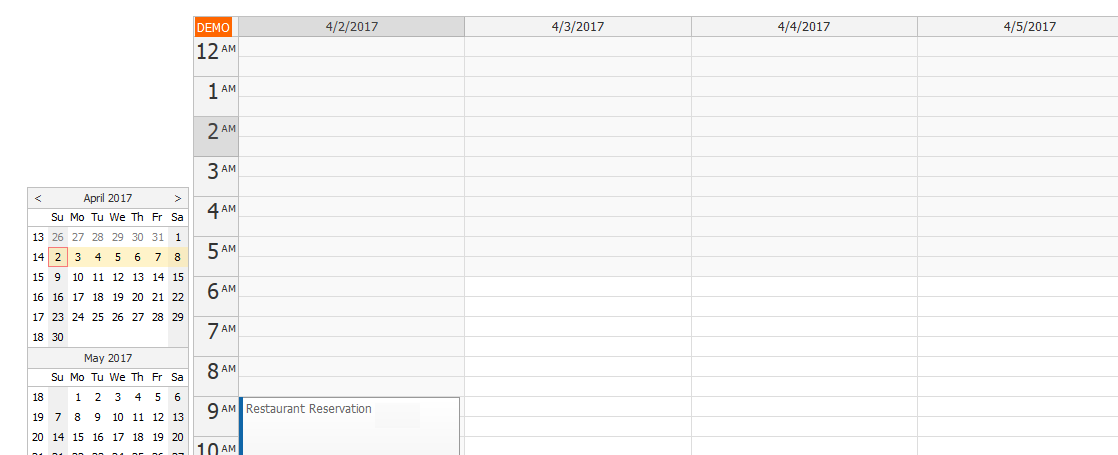
I'm trying to get showNonBusiness to hide the non-business hour on the control but I can't really get it to work. I've got the latest demo JS file but it keeps showing non-business hours in my control. I even tried to use onIncludeTimeCell to hide them but I still get all the non-business hours. Here is my code sample:
var dp = new DayPilot.Calendar("dp");
// view
dp.startDate = calDate.yyyymmdd();
dp.days = 7;
dp.moveBy = 'Full';
dp.viewType = "Week";
// Specific time
dp.businessBeginsHour = 6;
dp.businessEndsHour = 22;
dp.showNonBusiness = false;
// Version 8.3.3548
dp.businessWeekends = true;
dp.onIncludeTimeCell = function (args) {
args.cell.visible = !(args.cell.start.getHours() > 22 || args.cell.start.getHours() < 6);
};
dp.scale = "Hour";
But what I get when I render it is the screenshot below, it sows all the non-business hours.
I used dayBeginsHour and dayEndsHour instead and that worked perfectly. I'm not sure if showNonBusiness is deprecated, I tried to debug the script and saw those two so I used them. So now my only problem is the business weekends, I need to show business hours for the entire week. Any way I can achieve that please?
Thanks a lot.
Comment posted by Anonymous 9 years ago.
Managed to do the weekend thing using onBeforeCellRender. Just in case anyone else is interested here is the final snippet of code:
Comment posted by Dan Letecky [DayPilot] 9 years ago.
Thanks for posting the solution.
The DayPilot.Calendar class uses dayBeginsHour/dayEndsHour to hide non-business hours. Another option is to use heightSpec = "BusinessHoursNoScroll" which will hide hours outside of businessBeginsHour/businessEndsHour:
 DayPilot