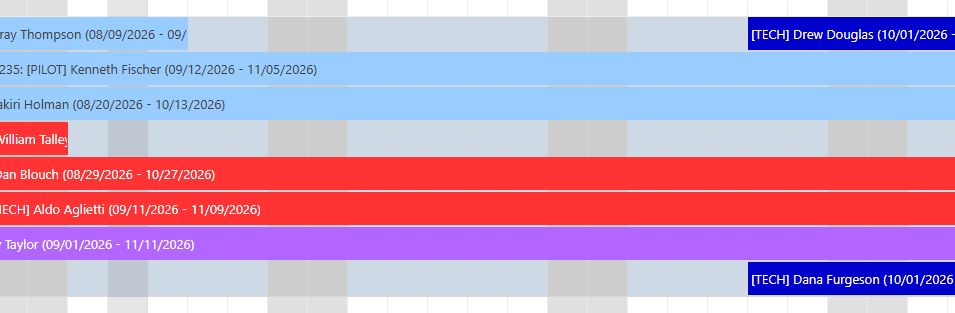
Not sure if a bug but have a asp.net webforms scheduler that has multiple events per row. I’m using EventSortExpression and have added a sort column to my db so that the events will sort in a specific manner. It…mostly works but I’ve got one event that, despite it having a “sort value” that should place the event below all the other events it ends up on top of the row. Another event with the same “sort value” correctly sits at the bottom of the row - see attached image.
It seems to get a little weirder; if I remove the offending event, the event that has the same “sort value” … the one that was playing nicely … moves to the top of the row into the same location where the event that I removed was sitting. I have confirmed that my sorting values are set correctly in the db column and I have the name of the column as the value in the aspx markup for EventSortExpression so I’m a little confused as to what is going on - any thoughts?
For reference in the attached image: the light blue events have a sorting value of 1, red events are a 3 (no 2’s in the example though they exist elsewhere), purple events are set to a value of 4, and the dark blue events (the problem children here…) are set to 7.
Comment posted by Dan Letecky [DayPilot] 1 months ago.
When arranging events within a row, the Scheduler always tries to use as few lines as possible. This means that if there is free space, it will be used.
That may cause some confusion: you expect the blue events to be displayed below the purple ones, but there is free space in the first line, so the event is placed there. The first red line probably contains an event (not visible in the screenshot) that prevents the blue events from being placed there.
The event arrangement rules are explained in this tutorial:
Ah, I see...ok, I’ll review the link you sent but in breaking it down, “Barney-style” for me is there any practical way to sort in the manner that I'm trying to do?
Thanks
Comment posted by Dan Letecky [DayPilot] 1 months ago.
At this moment, I don’t see an easy way. There is the split resources feature, but it would reserve the full width for each event priority and it’s only available in the JavaScript version.
But please let me check the algorithm, maybe it would be possible to modify it to support this scenario.
Comment posted by Ed 1 months ago.
OK thanks!
Answer posted by Dan Letecky [DayPilot] 27 days ago.
This is now implemented in the JavaScript version as an optional mode - the event order can prefer the priority over row compactness. It will be included in the next JavaScript release that is scheduled for October 1. The ASP.NET WebForms version wil follow.
Comment posted by Ed 27 days ago.
That’s great news - I’ll watch for the ASP.net release. Thanks for the effort!
Comment posted by Dan Letecky [DayPilot] 11 days ago.
The new ASP.NET release is now available (2026.4.3905).
You can configure this behavior using the EventSortStrictEnabled property.
This question is more than 1 month old and has been closed. Please create a new question if you have anything to add.
 DayPilot